Legacy System Modernization: Strangler Fig, Big Bang, or Incremental Migration?
Legacy system modernization compared: strangler fig vs big bang vs incremental migration, with risk and cost t...
Custom CRM vs Salesforce vs HubSpot compared: total cost, control, and when building your own CRM creates real competitive advantage.
Building your own CRM creates competitive advantage only when your sales, service, or revenue process is itself a differentiator that no off-the-shelf product can model without expensive distortion. For most companies, Salesforce or HubSpot wins on speed, ecosystem, and total cost. For a specific minority with unusual data models, embedded workflows, or platform ambitions, a custom CRM stops being a cost centre and becomes a moat. This guide gives you the decision framework, the real total cost of ownership, and a comparison you can take to a board meeting.
The temptation to build is strong because every CRM feels almost right and never quite fits. That gap is real. The question is whether closing it with custom code returns more than it costs over five years, or whether you are about to rebuild a commodity at premium prices. Most "custom CRM" projects fail the second test.
We will work through when custom genuinely wins, how the three options compare on cost and capability, a phased build roadmap if you do commit, the mistakes that sink these projects, and an honest build-versus-buy recommendation. The aim is a decision you can defend, not a sales pitch for any direction.
Key Takeaways
- Custom CRM wins when your revenue process is proprietary, your data model is fundamentally non-standard, or the CRM must be an embedded part of a product you sell. Otherwise, buy.
- Five-year TCO for a custom CRM serving 100 to 300 users typically runs $600K to $2M+ once you include maintenance, not just the initial build. Salesforce and HubSpot front-load less but compound through per-seat fees and add-ons.
- The hybrid pattern beats both extremes: keep a packaged CRM as system of record and build custom apps on top of, or alongside, it for your differentiated workflows.
- The most common failure is rebuilding commodity CRM features (contacts, pipelines, email) instead of the 10% that is actually unique to you.
- Decide with a weighted scorecard across differentiation, data model fit, integration depth, compliance, and team capacity, not on gut feel or a single demo.
A custom CRM is not one thing, and conflating the options is how budgets explode. There are at least four distinct builds hiding under the phrase, each with a different cost and risk profile. Naming yours precisely is the first useful decision.
The full ground-up build means your own data model, application layer, UI, and integrations, owned end to end. This is the rarest and most expensive path, justified only by genuine product-level differentiation. The platform-extension build keeps Salesforce or HubSpot as the core and adds custom objects, Apex or serverless code, and Lightning or React components on top. The headless or composable build uses a CRM API as a data backend while you own the experience layer entirely. The lightweight internal build uses low-code or a framework like Django, Rails, or Laravel to model a narrow, specific process for a small team.
Most teams who say they need a custom CRM actually need a platform extension or a lightweight internal tool. They have one or two workflows the packaged product handles badly and conclude the whole thing must be replaced. It rarely must. Scoping to the actual gap usually converts a two-year project into a two-month one.
Throughout this article, "custom CRM" means a build where you own a meaningful share of the data model and application logic, whether ground-up or composable. That is the decision with real stakes.
Custom only pays back when the CRM does something a packaged product structurally cannot, not merely something it does awkwardly. Awkward can be fixed with configuration and a good admin. Structural mismatch cannot, and that is where the case for building begins.
If how you sell, price, provision, or service is itself a differentiator, then encoding it in a generic pipeline flattens your advantage. Usage-based pricing engines, complex multi-party deals, regulated quote-to-cash flows, and marketplace matching logic often fit this description. A telecom provisioning flow or a logistics broker's load-matching engine is not a "pipeline stage."
Standard CRMs assume Account, Contact, Lead, Opportunity. If your real entities are vessels, clinical sites, properties, fleets, or policies with deep hierarchies and many-to-many relationships, you will spend years bending custom objects to approximate them. At some volume of customisation, the packaged platform becomes harder to maintain than purpose-built schema.
If you are a SaaS company and CRM-like features are part of your own product, you cannot ship Salesforce inside your app. You build. This is closely tied to multi-tenant product architecture, and the cost drivers overlap with those covered in our guide to SaaS development costs in 2026.
When the CRM must sit at the centre of a dense web of internal systems with real-time, bidirectional sync and your data already lives in your own warehouse, owning the schema can reduce integration friction rather than add it. This is the inverse of the usual lock-in argument.
If your need is "better than what we have," packaged wins. If your differentiation is in product, marketing, or service quality rather than the sales mechanics themselves, packaged wins. If you have no in-house platform engineering capacity to maintain a build for five-plus years, packaged wins regardless of how good the case looks on paper. Be honest here. Most companies sit in this group.
The three options are not really competitors so much as different bets on where you want to spend effort and money. Salesforce buys you depth and an ecosystem at the price of complexity and per-seat cost. HubSpot buys you speed and usability at the price of ceiling. Custom buys you fit at the price of ownership. The table below frames the trade-off honestly.
| Dimension | Custom CRM | Salesforce | HubSpot |
|---|---|---|---|
| Best for | Proprietary process, non-standard data, embedded product | Complex enterprise sales, deep ecosystem needs | SMB to mid-market, fast time to value, marketing-led |
| Time to first value | Months (3 to 12+) | Weeks to months | Days to weeks |
| Data model fit | Exact (you design it) | Flexible via custom objects, with limits | Good for standard, weaker for complex |
| Per-user licence cost | None (infra + maintenance instead) | High (Enterprise/Unlimited tiers) | Moderate, rises sharply at higher tiers |
| Customisation ceiling | Unlimited | Very high, with platform constraints | Moderate, opinionated |
| Ecosystem / marketplace | None (you build integrations) | Largest (AppExchange) | Strong, growing |
| Maintenance burden | You own all of it | Vendor owns core, you own config/code | Vendor owns most |
| Vendor lock-in | Low (you own the code) | High | Moderate to high |
| AI features | Build or integrate yourself | Einstein, packaged but priced | Breeze, accessible |
| Talent availability | General engineers, scarce domain admins | Large but expensive admin/dev pool | Broad, lower cost |
| Five-year cost shape | High build, lower marginal per seat | Moderate start, compounding licences | Low start, compounding at scale |
Notice that the row that should drive your decision is "best for," not "customisation ceiling." Custom always wins on ceiling. That is precisely the trap. The relevant question is whether you will ever need to approach that ceiling, and whether the licence costs you avoid exceed the engineering costs you take on. For most teams, they do not.
The AI row deserves a word of caution. Packaged AI features such as Einstein and Breeze are convenient, but a custom build lets you embed retrieval-grounded AI directly against your own data, which matters when accuracy and auditability are non-negotiable. The patterns for doing this safely are covered in our guide to enterprise RAG systems. If you go custom partly for AI, plan that capability deliberately rather than bolting it on later.
The build-versus-buy debate is usually lost on day one because people compare a build estimate against an annual licence and stop there. TCO is a five-year picture, and on both sides the recurring costs dwarf the headline number. Below is a realistic five-year model for a CRM serving roughly 100 to 300 users. Treat every figure as an industry estimate to calibrate, not a quote.
| Cost component | Custom CRM (5 yr) | Salesforce (5 yr) | HubSpot (5 yr) |
|---|---|---|---|
| Initial build / implementation | $250K–800K | $50K–250K (setup + consulting) | $15K–80K (onboarding) |
| Licences (per seat, 5 yr) | $0 | $450K–1.5M | $200K–700K |
| Add-ons / premium features | Built in or integrated | $100K–400K (CPQ, AI, etc.) | $60K–250K (Suite tiers) |
| Maintenance / engineering | $300K–900K | $150K–400K (admins, devs) | $80K–200K (ops) |
| Infrastructure / hosting | $60K–200K | Included | Included |
| Integration work | $80K–300K | $60K–200K | $30K–120K |
| Indicative 5-yr TCO | $600K–2M+ | $750K–2.5M+ | $350K–1.2M+ |
Notice that custom CRM maintenance can rival or exceed the build cost over five years. A CRM is never finished. Browsers change, integrations break, security patches land, the business pivots, and someone has to own all of it. Teams that budget the build but not the decade of ownership end up with an unmaintained internal tool that quietly rots. If you cannot fund a standing team, the TCO model is fiction.
Packaged CRMs hide cost in licence creep, mandatory tier upgrades to access one feature, integration middleware, and the specialist admins you must hire or contract. Salesforce in particular can cost more than a custom build at scale once CPQ, AI, and premium support stack up. The buy path is not automatically cheaper. It is cheaper to start and harder to escape.
Reach the build-versus-buy call with evidence, not instinct. The scorecard below weights the five factors that actually predict whether a custom CRM returns its investment. Score each from 0 to 5, multiply by the weight, and sum. The interpretation bands follow.
| Factor | Weight | Score 0–2 (lean buy) | Score 3–5 (lean build) |
|---|---|---|---|
| Process differentiation | 30% | Standard sales/service motion | Proprietary revenue mechanics |
| Data model fit | 25% | Maps to Account/Contact/Deal | Deeply non-standard entities |
| Integration depth | 15% | A few standard connectors | Dense, real-time, bidirectional |
| Compliance / data control | 15% | Standard regulatory needs | Strict residency or audit needs |
| Engineering capacity | 15% | No standing platform team | Mature platform engineering |
A weighted total below 2.5 means buy: choose Salesforce for enterprise complexity, HubSpot for speed and mid-market fit. Between 2.5 and 3.5 means hybrid: buy the core, build the differentiated layer on top. Above 3.5 means a custom build has a credible case, but only proceed if the engineering-capacity factor itself scored 3 or higher. A high total resting on a low capacity score is a project that will be started and abandoned.
Process differentiation carries the most weight because it is the only factor that turns a CRM from a cost into a moat. Everything else is about feasibility and risk. Data model fit comes second because schema mismatch is the slow, compounding tax that makes packaged customisation eventually cost more than building. The three 15% factors are gates: any one scoring 0 should make you pause regardless of the total, because weak capacity, ignored compliance, or shallow integration each sink builds on their own.
The most defensible answer for teams in the middle is rarely pure build or pure buy. It is a composable architecture: a packaged CRM as the system of record for commodity objects, with custom services owning the differentiated workflows and a clean integration layer between them. You build the 10% that is yours and rent the 90% that is not.
   +-------------------+        +---------------------------+
   |   Users / Sales   |        |   Customer-facing app     |
   |   service teams   |        |   (if CRM is embedded)    |
   +---------+---------+        +-------------+-------------+
             |                                |
             v                                v
   +-------------------------------------------------------+
   |              Experience layer (custom UI)             |
   |     React / internal portal  ·  role-based views      |
   +---------------------------+---------------------------+
                               |
                               v
   +-------------------------------------------------------+
   |          Integration / API layer (event bus)          |
   |   Webhooks · CDC · idempotent sync · audit logging    |
   +------------------+----------------+-------------------+
                      |                |
          +-----------v----+   +-------v------------------+
          | Packaged CRM   |   | Custom services          |
          | (SF / HubSpot) |   | Proprietary workflow      |
          | system of      |   | engine · pricing · domain |
          | record         |   | data model (your moat)    |
          +-----------+----+   +-------+------------------+
                      |                |
                      v                v
            +---------------------------------+
            |   Data warehouse / lakehouse    |
            |   single source of truth + BI   |
            +---------------------------------+
You avoid rebuilding contacts, email logging, and basic pipelines, which are commodity and where packaged tools are genuinely good. You concentrate engineering on the differentiated workflow engine, which is where the return is. And you keep an exit: the packaged layer can be swapped or the custom layer can absorb more over time as your needs prove out. The integration layer must be event-driven and idempotent, with full audit logging, because two-way sync between systems of record is where data corruption silently begins.
This is the same architectural instinct that drives composable ERP decisions, where teams keep a stable core and build differentiated capability around it. The reasoning generalises across enterprise systems, as we cover in our analysis of custom ERP versus off-the-shelf solutions. The pattern recurs because it isolates differentiation from commodity, which is the core of good enterprise architecture.
Consider the recurring pattern among vertical SaaS companies, healthcare scheduling platforms, property management systems, and logistics brokerages. These firms repeatedly conclude that a horizontal CRM cannot model their core entities, so they build CRM-like capabilities into their own products. The pattern is well documented across vertical SaaS: the "CRM" is not a back-office tool, it is a feature of what they sell.
Take a logistics brokerage as a representative example. Its core object is a load, matched to carriers by lane, equipment, and rate, with margin calculated per shipment. Salesforce can approximate this with custom objects, but the matching logic, real-time rate calculation, and carrier scorecards are the business. Encoding them in a generic opportunity record would slow every broker and obscure the data the company competes on. So the build case is strong on process differentiation and data model fit, the two heaviest factors in the scorecard.
The instructive part is what these companies still buy. Most do not build marketing automation, email deliverability, or general contact management from scratch. They build the proprietary matching and pricing core and integrate packaged tools for the commodity edges. That is the hybrid pattern in practice, and it is why disciplined custom builds succeed where ground-up rebuilds of everything fail. Engineering partners such as Mind Supernova are often brought in precisely for this differentiated core, where senior product engineers matter more than CRM admins.
Choosing such a partner carries its own risk, especially when an AI-heavy build is involved, and getting the selection wrong is as expensive as getting the build-versus-buy call wrong. Our 2026 checklist for choosing an AI outsourcing partner sets out the diligence that separates a partner who maintains the differentiated layer for years from one who ships and disappears.
A custom CRM should be delivered in phases that each return value, never as a two-year big-bang replacement. Big-bang CRM migrations have an ugly failure record because they force users to switch everything at once while data quality and adoption are still unproven. Phase it so you can stop or pivot at any boundary.
Run the scorecard with real stakeholders. Map the actual entities and the genuinely differentiated workflows. Define what you will buy versus build. Produce a thin architecture and a TCO model the CFO signs. The deliverable is a go or no-go, not a green light by default.
Build only the workflow that justified the project, for one team, with real data. Integrate a packaged tool or a stub for the commodity edges. Ship to a pilot group and measure adoption and cycle-time impact before widening. Resist the urge to add commodity features here.
Stand up the event-driven integration layer, the migration tooling, and the warehouse sync. This is unglamorous and routinely underestimated. Data migration from a legacy CRM is its own project with its own deduplication and validation work, similar in shape to broader platform migrations covered in our piece on legacy system modernization.
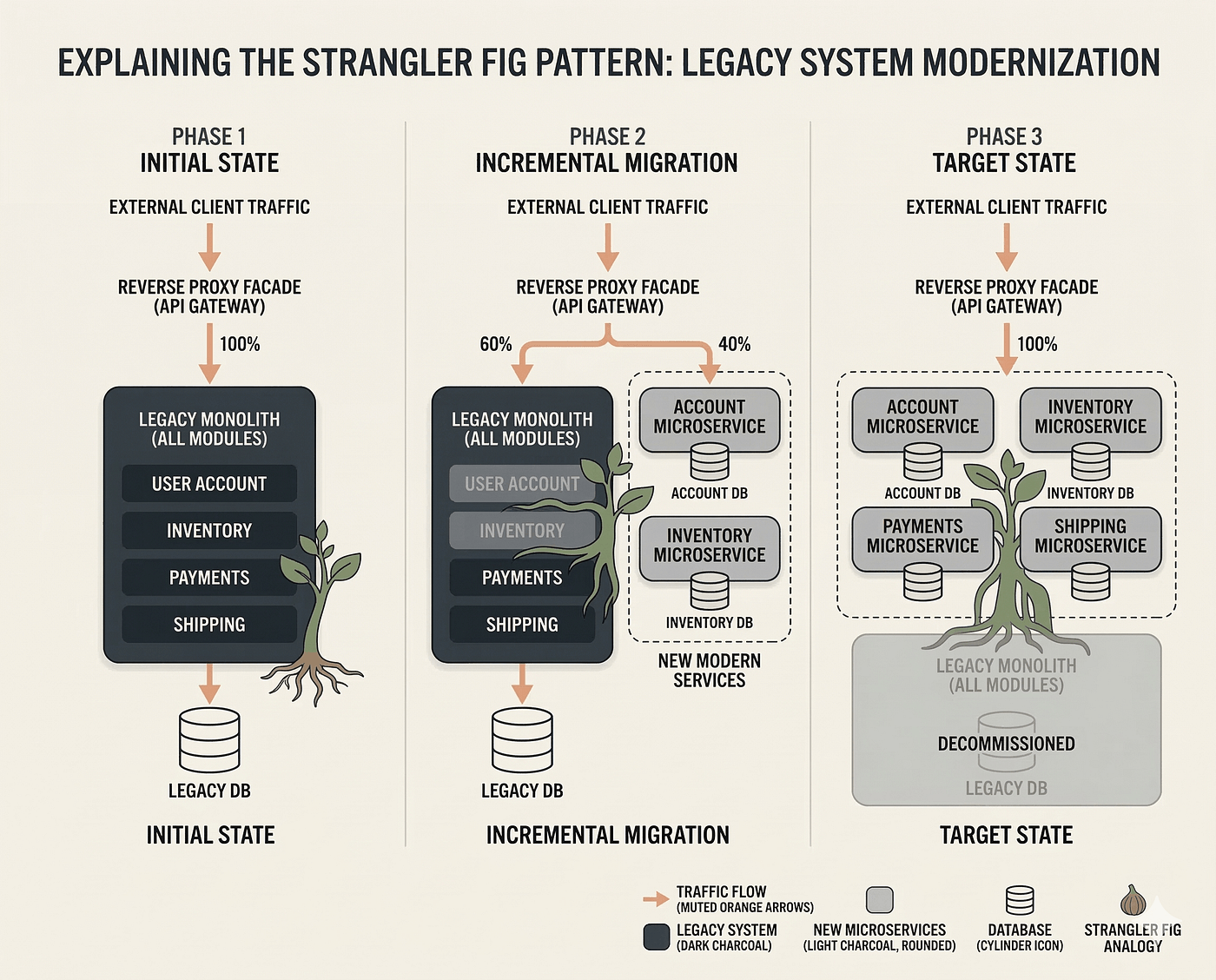
Expand team by team using a strangler-style cutover, retiring old workflows incrementally rather than all at once. Add reporting, permissions, audit, and the operational tooling support teams need. Establish the standing maintenance team now, not later.
Treat the CRM as a living product with a backlog, an owner, and a roadmap. Add AI features, deepen analytics, and absorb more workflows only when each clears its own ROI bar. The phase that never ends is the one most teams forget to fund.
Most failed custom CRMs fail for predictable reasons, and nearly all of them are about scope, ownership, or adoption rather than technology. Watch for these.
For roughly 80% of companies, buy: choose HubSpot for speed, usability, and mid-market fit, or Salesforce for enterprise depth and ecosystem reach. The licence cost is real but it buys you maintenance, security, and a feature roadmap you never have to staff. Spending engineering capacity to rebuild a commodity is among the most expensive mistakes in enterprise software.
For the minority whose scorecard clears 3.5 with genuine engineering capacity, build, but build the hybrid: a packaged system of record plus a custom differentiation layer, never a ground-up rebuild of everything. Concentrate every engineering hour on the workflow that is your moat and rent the rest. This is the pattern that consistently returns its investment.
If you lack a standing platform team, your safe move is buy plus a thin custom layer delivered by a dedicated engineering partner who can also maintain it. This is where an offshore model with 4+ hours daily UK overlap is genuinely useful: teams like Mind Supernova can stand up senior engineers in 5 to 7 days to build and own the differentiated layer, while you keep the packaged CRM for commodity needs. Engaging through a dedicated software team or staff augmentation keeps maintenance funded without building a permanent internal CRM team. If you want to pressure-test your own scorecard with engineers who have built this pattern, schedule a call.
Rarely at first, sometimes over five years. Custom front-loads build cost but eliminates per-seat licences, so at high seat counts and long horizons the lines can cross. The decisive cost is maintenance, which is recurring on both sides. Compare full five-year TCO, not a build estimate against an annual licence.
Build when your revenue process is proprietary, your core data model is fundamentally non-standard, or CRM features are embedded in a product you sell, and you have a standing engineering team to maintain it. If your need is simply "better than what we have," buy and configure instead. Most companies fall in the buy group.
HubSpot suits speed, usability, and marketing-led mid-market teams with faster time to value and lower setup cost. Salesforce suits complex enterprise sales, deep customisation, and ecosystem needs, at higher cost and complexity. Match the tool to your process maturity, not to brand reputation. Many mid-sized firms outgrow HubSpot into Salesforce.
The hybrid approach keeps a packaged CRM such as Salesforce or HubSpot as the system of record for commodity objects, while you build custom services for your differentiated workflows on top, connected by an event-driven integration layer. You build the 10% that is unique and rent the 90% that is commodity, which lowers risk and preserves an exit.
A differentiated-core MVP for one team typically takes three to four months, with integration, migration, and rollout extending a full deployment to nine to fifteen months. Ground-up rebuilds of everything take far longer and carry much higher risk. Phasing each stage to return value separately is what keeps the timeline survivable.
The custom-versus-packaged CRM decision is not about which tool is best. It is about whether your revenue process is differentiated enough to justify owning code for a decade. For most companies it is not, and buying then configuring well is the disciplined, cheaper answer. For the minority whose process is the product, the hybrid build is a real competitive advantage. The scorecard tells you which you are.
This quarter: run the weighted scorecard with sales, service, and engineering leadership in the room. Map your actual entities against the standard CRM model and name your genuinely differentiated workflows. Build the full five-year TCO for all three options, with the maintenance line included.
Next 90 days: if you scored below 3.5, optimise your packaged CRM configuration before spending another dollar. If you scored above it with real engineering capacity, scope a differentiated-core MVP and a thin integration layer, not a rebuild. If you need senior engineers to build or maintain that layer without standing up a permanent team, talk to our engineering team and pressure-test the plan before you commit budget.
Legacy system modernization compared: strangler fig vs big bang vs incremental migration, with risk and cost t...
AI-powered ERP moves beyond automation to decision intelligence: agents in ERP, the data foundation required,...
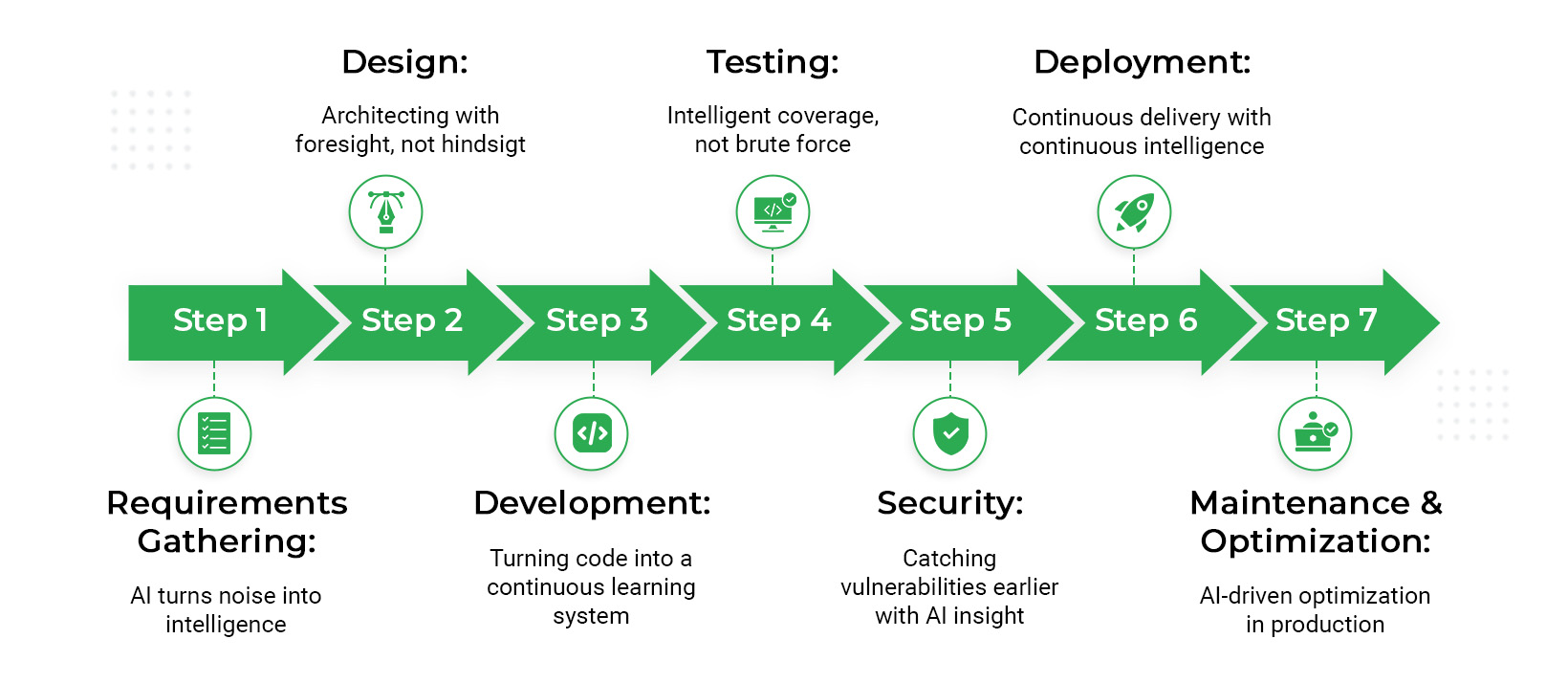
How AI is reshaping the enterprise SDLC across plan, design, code, test, release, and operate, with productivi...